Java Simulation Infrastructure Toolkit (JSIT): User Guide
JSIT Version: 0.2
Last Updated: 5th June 2018
Contents
- Introduction
- Usage Overview
- Detailed User Guide
Introduction
The Java Simulation Infrastructure Toolkit (JSIT) is a set of Java libraries
which adds a set of useful 'infrastructural' features for
simulation:
- advanced logging with switchable levels per model
components and separation of outputs per run;
- the ability to control the stochasticity in the
model external to the model code (plus providing a standardised interface
to stochastic functions across simulation frameworks), which is particularly
useful for model testing;
- a publish-subscribe events architecture which
allows for model components to be more easily de-coupled from each other
(especially useful when separating model from model visualisation);
- some support for reproducible simulation runs
and thus results provenance.
JSIT also suggests some best-practice ways of splitting up your source code
(separating simulation from experiments), though this is not required.
Where this user guide uses the term 'framework', it is
always referring to a simulation framework that JSIT is being used with (such as
AnyLogic), and not JSIT itself (though it can also be regarded as a
framework).
JSIT can be used in any Java-based simulation (or any simulation which can
interoperate with Java), though the focus is on something that will integrate
nicely with Java-based simulation frameworks such as MASON, Repast Simphony or AnyLogic. (JSIT was thought up precisely
because all the Java-based simulation frameworks the author is aware of
lack these important features, at least in the relatively 'full' form provided
by JSIT.)
Helper libraries for at least MASON and Repast Simphony
are planned.
Using the core JSIT library in a given simulation framework requires a fair
degree of thought and custom code, so JSIT also provides helper libraries for specific frameworks which provide
robust, well-designed and reusable ways to more simply integrate with any model
written using that framework and avoid having to integrate in a 'raw' way. (They
also sometimes add useful helper features that leverage tools available in that
framework.) Currently, a helper library is only available for AnyLogic,
though there is an example model which shows one
way to do a raw integration for a MASON-based model.
There is an open-access
academic journal paper which gives much more detail on the rationale for
JSIT and why modellers might want to use the features above (as well as the
wider picture of best-practice software engineering principles for simulation,
and why the helper library focus was on AnyLogic).
Please cite this paper (using the citation below) when using JSIT for any
models that are included in your own academic papers.
Rossiter, S. (2015). Simulation Design: Trans-Paradigm Best-Practice from
Software Engineering. Journal of Artificial Societies & Social
Simulations (JASSS).
Features Overview
Below is a basic list of current features (and some side notes on intended
future functionality). The paper mentioned above provides some extra detail.
Logging
This is supported by the powerful and widely-used Logback open-source logging libraries.
- Log diagnostic messages at different detail levels and control which detail
levels are 'turned on' per-run in a configuration file.
- Configure logging granularity: different log levels can be enabled for
different components of your model.
- Separate logs per simulation run in timestamped folders, including the
handling of multi-run experiments, restarted runs from a control GUI, and
parallelised runs in the same JVM (which AnyLogic supports).
- Automatic logging (in the timestamped outputs folder) of any published
domain events in a separate events log file.
Stochasticity Control
Currently only a (useful) subset of a 'standard' set of
distributions is supported, purely due to development time limitations.
- Represent each probability distribution you use in the model as an explicit
named object, with these details logged at run-time. (This gives traceability
and automated 'documentation' of all stochasticity in the model.)
- Use a standard API and definition of distributions across simulation
frameworks. (The framework is still being used for the underlying
implementation of the distributions that it supports; any it does not
support cannot be used.)
- Share these distributions as needed: typically a distribution is shared by
all instances of some model component class which are for the same model
run (which is made more complicated if there are parallel runs of the model
in the same JVM, since you cannot just store these distributions as
static class fields since some instances of the class might be for
one run, and some for another).
It is intended that other generic 'stochasticity control'
operations will be supported, such as increasing / decreasing variance or
collapsing continuous distributions to a discrete set of outcomes.
- Via per-run configuration files, be able to collapse selected distributions
to their mean value to aid model testing and understanding (i.e., 'turn off
stochasticity' in particular areas for that run).
Publish-Subscribe Events Architecture
- Define model events that have meaning in the domain being modelled (I call
these domain events) and have these automatically
logged to provide a model narrative.
Asynchronous event communication would be another
possibility (where receivers 'check their mail' as they need to; a pull
architecture, rather than a push one), but is not currently implemented.
- Allow for two alternative architectures (which can be freely mixed if
desired) which allow receivers (event subscribers) to receive information on
model events which have occurred:
- Marker-Based Events
- The receivers just receive a 'marker' that an event has occurred (with
useful human-readable detail in a log message), and then query the event source
object to get the information they need (requiring those objects/agents to have
the relevant information available, and the caller to know about these model
classes). The markers are implemented as the event sources providing a
source-class-specific enum and a method returning the enum that indicates the
event alternative that just occurred. (A given model class may generate any
number of alternative events.)
- Message-Class Events
- Have messages (objects of event-source-specific message classes) sent to
receivers which may contain either all required information (thus isolating
receivers from anything other than the message classes), and/or contain
references to model classes (or informational interfaces for them) to obtain
further information.
This allows for models to be designed in a nicely decoupled
way, and is particularly useful when visualisation components need to update to
reflect these events. (As a general design principle, model components should
not be explicitly 'aware' of what is visualising them.)
Run Reproducibility
Ideally these run settings would also allow you to
automatically recreate a model run, but that is much more sophisticated
functionality that may be explored in future.
- Automatic creation of a run settings file (in XML) which contains
information that allows you to recreate runs. This includes all model parameter
settings, provenance for the model code (in terms of its version-control system
(VCS) location) and environmental information (e.g., version of Java).
- Ability for the user to define a model name and version which is reported in
outputs.
- Run-time checks as to whether the model code being run has been altered from
anything checked-out or exported from a VCS (which would mean
that you might not be able to exactly reproduce this run since the code run is
not stored and referenceable via the VCS).
Currently only
Subversion is supported as a VCS,
though there is also a way to 'checkpoint' a model's code without using a
VCS.
- A JSIT-tooled VCS commit process which maintains the meta-data needed to
support the functionality above.
Usage Overview
Models may have multiple 'runnable top-level classes' to
cater for different visualisation (GUI) alternatives, especially for frameworks
such as MASON which make a very clean separation between model and
visualisation. Yet there is normally one 'core' root class which represents a
visualisation-less ('headless') or minimal-visualisation implementation of the
model (and this will be the model root in the sense here); the other top-level
classes will aggregate an instance of this core class. However, we will see
that, for AnyLogic models, it is best to make all these top-level classes model
roots, coded in such a way that only the first-initialised one actually sets up
the infrastructure.
The UML class diagram in Figure 1 summarises the core JSIT classes and
how they fit into a user-written model:
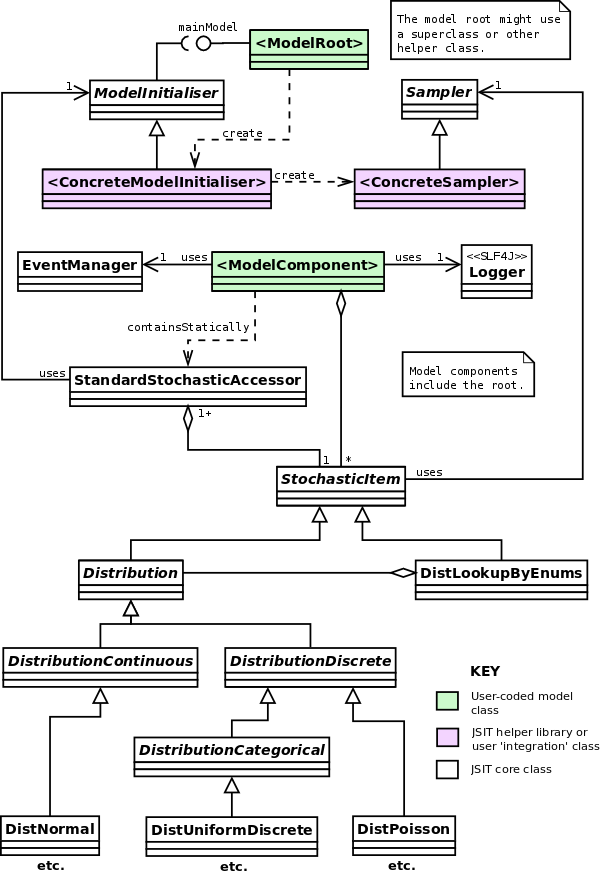
Figure 1: Overview of JSIT class structure within a user
model.
The user's model consists of a 'root' class and some set of model components
which it composes (here indicated by <ModelRoot> for the
root, and <ModelComponent> for some given component, which
could also be the root). The root class needs to implement the JSIT
MainModel interface (possibly via a superclass or other helper
class) and set up some concrete subclass of ModelInitialiser which
initialises the JSIT framework (in particular the logging, which we want to be
set up at the earliest possible opportunity so that messages can be logged
during 'early' parts of model initialisation).
The concrete ModelInitialiser will set up a concrete
Sampler subclass which links the set of stochasticity classes to
some actual framework implementation. JSIT is not intended to provide some
'canonical' set of stochastic implementations; the JSIT classes are
wrappers to some underlying implementation which ensure a consistent API and
(crucially) allow for the stochasticity to be controlled external to the model's
code.
Helper libraries do virtually all the work above for you for a given
simulation framework. With all this set up, the model's user code can then
use the JSIT features as it needs to:
- Use SLF4J
Logger instances for
logging (using Logback as the underlying
implementation) and a Logback configuration file to control the logging per
run.
- Code in the concrete
ModelInitialiser will automatically store
settings for each run (including all model parameters and information on the
environment, where this includes provenance for the model code via its location
in a version control system).
As in the diagram, stochastic items are normally accessed
via a StandardStochasticAccessor, which is explained later.
- JSIT
AbstractStochasticItem subclasses are used for probability
distributions (and related components such as distribution-lookups via Java enum
'keys'), and per-run configuration files to control this stochasticity.
- The JSIT
EventManager is used to publish and subscribe to
events (using EventSource and EventReceiver interfaces
which are not shown in the diagram).
JSIT also provides some helper tools for committing model code to
version-control systems which sets up the meta-data needed to have an audit
trail of model versions.
The JSIT implementation uses a lot of Java Generics
functionality (which means that Java 5+ is required) so that there is useful
compile-time type-checking for things like probablity distributions.
AnyLogic Specifics
Figure 2 below shows the equivalent of figure 1 for an AnyLogic model, and is
explained in more detail later. Note for now that
- There are now concrete AnyLogic helper library implementations.
- The model root class integrates with JSIT via a superclass
MainModel_AnyLogic (which implements the MainModel
interface).
- There are AnyLogic specific alternatives for the use of logging, and the
access to stochastic items. (These are because of threading issues specific to
AnyLogic.)
- There is an extra AnyLogic-specific stochastic items helper class
(
HyperArrayLookup) which leverages an AnyLogic component.
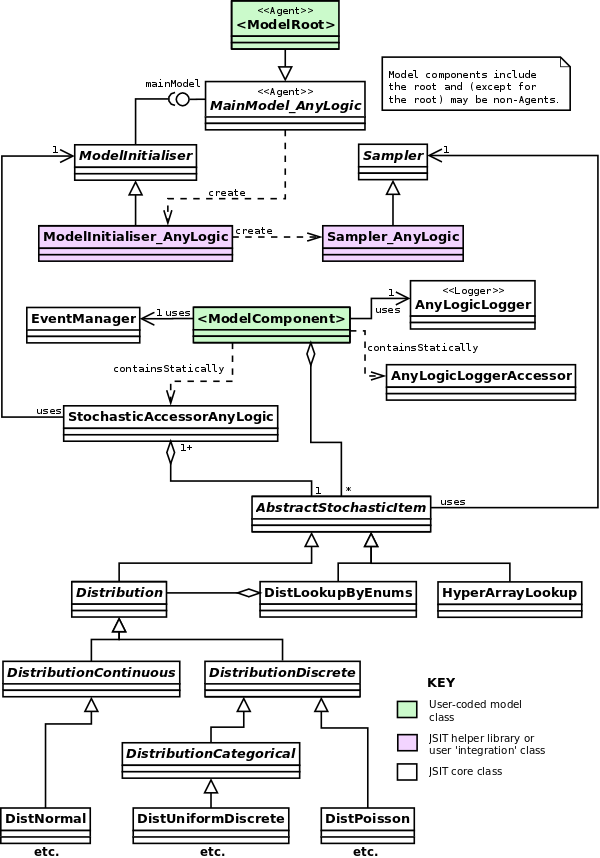
Figure 2: Overview of JSIT class structure within an AnyLogic user
model (using the JSIT AnyLogic helper library).
Example Models
Two example models are available for JSIT:
- A `real' (non-demo) complex AnyLogic model, which also demonstrates some
other design features recommended in the JSIT journal paper. It is available via
the
AMD_HealthSocialCareSim
SourceForge project.
- An extension of the MASON Heat Bugs demo model which shows one way to do a
raw implementation of JSIT integration (in this case using the MASON toolkit).
This also helps understand some of the design decisions (as well as aspects that
the forthcoming MASON helper library needs to consider). It is available via the
sprossiter/JSIT_DemoMASON
GitHub project.
Detailed User Guide
JSIT users will either be using a framework-specific helper library, or
coding their own 'raw' integration with JSIT (effectively their own set of
helper classes, which can be as 'minimal' or model-specific as desired). For
each area of usage, I break down the information as follows:
- details common to all usage scenarios;
- details for each helper library (and thus helper-library-supported
framework);
- details for a raw implementation (if any).
NB: Whenever I refer to filesystem paths, I use Linux-style forward
slashes as separators (cf. backslashes on Windows). Where these paths are
actually included in configuration files read by Java, you can actually leave
them as forward slashes on Windows, because Java will still interpret them
properly.
JSIT Setup & Initialisation
Common Details
Practically, not separating code for the simulation from
its experiments means that, for runs to be guaranteed reproducible, you would
need to commit all this code (i.e., model and experiments) to the VCS before
doing any run.
Your model's source code, and any libraries used, should exist under a single
'simulation' directory so that JSIT knows what comprises the code of the model.
This should ideally be separate from any code for model experiments because,
otherwise, JSIT cannot distinguish between the model itself having changed or
just some details of an experiment using it. (Since JSIT records details of all
the parameters set for each experiment in per-run outputs, experiments can be
reproduced from this information and the correct version of the
simulation code.)
There should be separate directories for JSIT-specific inputs (which apply to
all experiments run) and outputs (where individual runs will have
sub-directories automatically created by JSIT with timestamped names). Since
these relate only to experiments, it makes sense to group them with the source
code for your experiments.
Your experiments may take the form of batch scripts or
similar (rather than, or in combination with, source code) and so you might not
need the
Source and
Libs folders shown for
experiments.
If you are using an
IDE
like
Eclipse to develop and run your
model, then you can have
ModelX as a project or (perhaps better to
ensure that the separation is a clean one) have your
Sim and
Experiments directories as separate projects, with the latter
dependent on the former.
Let's assume in what follows that your model is called ModelX
and that you have directory structure as below (which is a sensible 'canonical'
structure given the above):
ModelX
    Sim
        Source
        Libs
    Experiments
        Source
        Libs
        Inputs
        Outputs
We'll talk about the 'simulation folder' and the 'experiments folder' in what
follows. Let's also assume that your model code is all in a single Java package
uk.ac.uniofsim.modelx.
Install SVN JavaHL (if needed)
JSIT uses this, rather than the pure-Java
SVNKit, for licensing reasons: JSIT could not be
licensed LGPL if using SVNKit. JavaHL is also typically faster and (being an
official Subversion component) is normally more up-to-date with SVN
changes.
If you are storing your model code in an SVN VCS, you will need an
implementation of the Apache
Subversion Java binding library (JavaHL) installed. This is a mixture of
native (OS-specific) and JAR libraries.
Ubuntu releases before Ubuntu 14.04 (Trusty) include SVN
1.6 rather than SVN 1.8, and thus JavaHL for SVN 1.6.
On Linux, there should be a package for this. On Ubuntu it is libsvn-java.
This installs the native libraries and puts the svn-javahl.jar JAR
file in /usr/share/java. You will need to reference this as a
run-time dependency for your model (i.e., a JAR on the classpath when you run
it).
It is unfortunate that the 'matching' JAR file for the
JavaHL native libraries needs to be taken from the JSIT distribution, especially
as this means that JSIT needs to keep up with new SVN releases; JSIT will only
include JARs for the latest release in a given minor SVN version (e.g., 1.6 or
1.8). The
Apache Subversion project
does not provide binary downloads of this JAR file.
I don't know why SlikSVN and CollabNet do not include the JAR file in their
distributions. The
WANDisco Subversion
client (
not SmartSVN)
does include the JAR file but is
only available in a 32-bit version, and so will not work on 64-bit Windows
installations (which tend to be the majority nowadays). Feel free to try that if
you have 32-bit Windows. For more background, there is a
StackOverflow question
and a
WANDisco
forum post about this.
On Windows, install either the SlikSVN or CollabNet SVN client to
install the native JavaHL libraries. This can exist alongside TortoiseSVN, which most Windows SVN users
tend to use for its GUI (but which does not include JavaHL). Then include the
relevant JavaHL JAR file from the JSIT distribution
(libsvn-java-<ver>.jar) for your SVN client version as a
run-time dependency for your model (i.e., a JAR on the classpath when you run
it).
Set Up Other Library Dependencies
In your simulation libraries folder, add JARs for the JSIT core library and
all its run-time dependencies (and their dependencies):
These are all included in the JSIT distribution.
You could separate out compile-time from run-time
dependencies, but many mainstream IDEs (such as
Eclipse) do not distinguish between them. (In
Eclipse, all compile- and run-time dependencies go in the build path.) If you
have separated the simulation and experiments into separate IDE projects, then
specifiying the experiments project as dependent on the simulation one typically
includes all its dependencies implicitly.
Add all of these as compile and run-time dependencies for your simulation and its
experiments (in the IDE you develop it in or however you compile and launch your
model).
Set Up Configuration Files
If you are using an IDE like Eclipse, whatever folders you
declare as source folders are typically compiled to a
bin folder,
and any non-Java files in your source folders are also copied there.
Thus, putting
logback.xml in your
Experiments/Source
folder will mean it is on the classpath (in the generated
bin
folder) at run-time.
You can also use Java code as below to print out the classpath at
run-time:
System.out.println("Classpath: " + System.getProperty("java.class.path"));
In a directory that will be on the Java classpath when running your
experiments, include a logging configuration file
logback.xml, customised from the template provided in
src/main/config/logback.xml (see the comments therein). Unless you
want to adjust the default logging behaviour, the only things you need to change
in the template is your model's Java package name as below:
If your model code is contained in multiple packages, use
multiple entries of the four lines with the appropriate package names in
each.
<logger name="uk.ac.uniofsim.modelx" level="INFO" additivity="false">
    <appender-ref ref="MSGS_RUN_SIFTER" />
    <appender-ref ref="CONSOLE" />
</logger>
In your simulation directory, include a customised JSIT model version file modelVersion.properties. If
your model code is in a Subversion (SVN) VCS, use
src/main/config/SVN/modelVersion.properties as a template, or
src/main/config/SVN_Legacy/modelVersion.properties if you are using
a pre-1.7 SVN client. Otherwise use
src/main/config/NoVCS/modelVersion.properties as a template. Fill
in the ModelName and ModelVersionNum fields (example
below for SVN 1.7+):
#   Model Version Control Properties File for SVN 1.7+ Client
#    USERS SHOULD ONLY EDIT ModelName and ModelVersionNum
#       Extra entries will be added on commit
ModelName = ModelX
ModelVersionNum = 0.1
ModelVCS = SVN
VersionFileRepoURL = $HeadURL$
LastCommitRev = $Revision$
This will be automatically updated if you commit model changes to a version
control system (or 'checkpoint' the model code if using the NoVCS file) using
JSIT tools.
You need to know what the working directory will be when
running your simulation, since all paths you give will be relative to this. When
developed in an IDE, the root directory of the project is normally the working
directory.
You can also use Java code as below to print out the working directory at
run-time:
import java.io.File;

System.out.println("Working directory: " + new File(".").getAbsolutePath());
In your experiments' inputs directory, include a model
source paths file modelSourcePaths.properties which tells
JSIT the paths from where your experiments are run to where certain aspects of
the model code resides. Use the template in
src/main/config/modelSourcePaths.properties. Given the directory
structure earlier, this would have non-comment contents as below:
ModelVersionFileDir = Sim
SimSourcePath = Sim
The second entry here (which can include multiple directories) is only needed if
you have the source code of the model available at run-time, as is the case in
the example given
. It is used so that JSIT can check whether the
simulation source code specified has been changed from the VCS version it came
from; you can also omit this second entry if you do have the source code
available, but don't want this check to be done.
Typically, you'd put the script in the root directory if
you are managing all the code as a single IDE project. (You don't have to in
this case, but this would mean having to commit non-simulation-code changes
separately.) If you have separate IDE projects for the simulation and its
experiments, it makes sense to include the script in the simulation folder and
use it only for committing simulation changes.
In either your 'root' model directory or your simulation directory, include a
customised commit/checkpoint batch script. If it is in
your root directory, it will be used to commit changes to all your model code
(or checkpoint the code if you are not using a VCS). If it is in your
simulation directory, it will be used to commit simulation-only changes. In
either case, any changes to simulation code (cf. other model code) will result
in the model properties file being automatically updated so as to record
version-control details of the simulation code.
For Windows, use src/main/scripts/commitModel.bat as a template;
for Linux use src/main/scripts/commitModel.sh (set as executable).
The script should be altered to include the path to your simulation code
directory (relative to where the script is). For Windows with the directory
structure above, and the script in the model root folder, the script would have
non-comment contents as below:
java -cp "Sim\Libs\*" ^
uk.ac.soton.simulation.jsit.core.ModelVersioningAssistant COMMIT Sim
echo -------------------------------------------------------
echo Commit complete (check for errors above). Press any key
pause
Summary
For completeness, your file structure should therefore be as below on Windows
assuming everything stated earlier (JAR file versions may differ):
ModelX
    commitModel.bat
    Sim
        modelVersion.properties
        Source
        Libs
            commons-codec-1.10.jar
            commons-configuration-1.10.jar
            commons-io-2.4.jar
            commons-lang-2.6.jar
            commons-logging-1.2.jar
            commons-math3-3.6.1.jar
            jsit-core-0.2.jar
            logback-classic-1.1.2.jar
            logback-core-1.1.2.jar
            slf4j-api-1.7.4.jar
            xmlpull-1.1.3.1.jar
            xpp3_min-1.1.4c.jar
            xstream-1.4.7.jar
    Experiments
        Source
            logback.xml
        Libs
        Inputs
            modelSourcePaths.properties
        Outputs
AnyLogic (via helper library)
There are some important specifics with respect to AnyLogic.
Setting the Java Package Name
By default, AnyLogic models generate code in a Java package which has the
same name as your ALP file. However, you can change this in the Advanced part of
the model's Properties; the below assumes you have changed this to
uk.ac.uniofsim.modelx as earlier.
Model & Experiments Separation
This method does unfortunately require the modeller to
keep the wrapper Agent in-sync with the wrapped one. (For example, if the set of
parameters changes that has to be reflected in the wrapper Agent.) It also means
that the model-only file (AnyLogic model) and experiments-only one both need to
be open in the AnyLogic client to be able to build and run experiments. I have
suggested to AnyLogic that being able to reference a top-level Agent from
another AnyLogic model would (therefore) be a powerful feature.
AnyLogic uses the term 'model' to refer to an ALP file, which is slightly
confusing for us here because one ALP file contains only experiments and no
'model'. That is one of the reasons I have consistently used the terminology
simulation and experiments, so there should be no confusion
that 'simulation' is referring to the without-experiments ALP file.
AnyLogic models are stored in .alp files and normally the
experiments (AnyLogic Experiments) are included in the same file. However, it
is possible to separate the two, as JSIT prefers, because you can
include (instances of) Agents from another model file. Thus, you can have a
simulation file (say ModelX.alp for our running example) with no
Experiments, and an experiments-only one (say
ModelX_Experiments.alp).
Unfortunately, an Experiment's top-level agent must still exist in the same
file, so you need to proceed as below:
- Create an Agent in your experiments file which is just a wrapper for the
required main Agent in the simulation file. That is,
- create a new Agent in your experiments file;
- copy all the AnyLogic parameters from the model's main Agent into the
wrapper Agent;
- add an embedded instance of the main Agent in (by dragging it from the
simulation file in the Projects tab to the design window for your wrapper
Agent);
- set each of its parameters to reference the respective wrapper Agent
parameter.
The example model shows this in action: see Agents
Main_Model and Main_ModelFullViz in
AMD_HealthSocialCare.alp, and their wrapper Agents
Main_ModelWrapper and Main_ModelFullVizWrapper in
AMD_ExperimentsDemos.alp.
- Set the wrapper Agent to be the top-level agent for your Experiment.
Logging Configuration Location
You can't include it in a LoggingConfig
folder outside of the ALP file Source folder because
AnyLogic currently (v7.1.2) has an issue where class folder model
dependencies that are not within the same directory as the model file are
referenced internally using absolute file paths, which means that they
will break if the model moves to a new absolute path (e.g., from under one
user's home directory to another's), even if the relative path to the dependency
stays the same. This was fixed in AnyLogic 7.1.2 for JAR files (and so is not an
issue for other dependencies as below), but the problem remains for class
folders.
AnyLogic does not copy across files to its 'hidden' build area
which are not referenced from the ALP file, so you cannot include
logback.xml in the same directory as the ALP file and have it on
the Java classpath at runtime. The simplest way to achieve it is to put
logback.xml in its own LoggingConfig or similar
directory (under the folder where the ALP file is) and add this as a dependency
to the experiments ALP file (specifying it as an External Class Folder and not
importing it to the model folder).
Dependencies
All the JAR file dependencies discussed earlier, plus the JSIT AnyLogic
helper library jsit-anylogic-<ver>.jar, need adding to your
AnyLogic simulation file as dependencies (in the Dependencies section of the
model's Properties).
Dependencies should be set as Java archive files accessed from their original
location and referred to by model folder (see Figure 3 below), which
ensures that relative paths to them are stored in the ALP file (and thus that
the code is transferable to different directories; e.g., another user's home
directory).
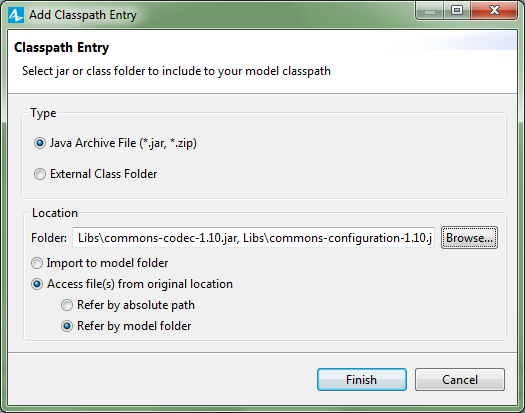
Figure 3: Screenshot of the AnyLogic add dependency (classpath
entry) window showing the required settings.
If you are using wrapper Agents as above in a separate experiments
ALP file, then these dependencies will automatically be used at
run-time because you are referencing that ALP file as a dependency
(which happens automatically when you drag an instance of the main Agent into
your wrapper Agent). However, you will also need to add the two JSIT libraries
(only) as dependencies for the experiments ALP file because they are needed at
compile time (jsit-core-<ver>.jar and
jsit-anylogic-<ver>.jar); you can reference them from the
main model ones (canonically in Sim/Libs).
Given all this, the canonical file structure would be as follows for an
AnyLogic model (also showing the ALP files):
ModelX
    commitModel.bat
    Sim
        modelVersion.properties
        Source
            ModelX.alp
        Libs
            commons-codec-1.10.jar
            commons-configuration-1.10.jar
            commons-io-2.4.jar
            commons-lang-2.6.jar
            commons-logging-1.2.jar
            commons-math3-3.6.1.jar
            jsit-anylogic-0.2.jar
            jsit-core-0.2.jar
            logback-classic-1.1.2.jar
            logback-core-1.1.2.jar
            slf4j-api-1.7.4.jar
            xmlpull-1.1.3.1.jar
            xpp3_min-1.1.4c.jar
            xstream-1.4.7.jar
    Experiments
        Source
            ModelX_Experiments.alp
            LoggingConfig
                logback.xml
        Libs
        Inputs
            modelSourcePaths.properties
        Outputs
Working Directory & Paths
The runtime working directory for AnyLogic models is set as the directory
where the source ALP file is which is being run. Thus, when running an
experiment using the canonical file structure above, the working directory is
the ModelX/Experiments/Source folder, and your
modelSourcePaths.properties entries should be as below:
ModelVersionFileDir = ../../Sim
SimSourcePath = ../../Sim
Coding of Top-Level Agent
You may have multiple possible top-level Agents for your
model (e.g., if you have one with additional visualisation to another, which you
can see in the
example model). In this case, you
will need to code each of them as specified here. At run-time, JSIT makes sure
that only the Agent initialised first (the one most nested in the Agent
hierarchy for this model) will actually initialise JSIT.
The top-level Agent in your simulation ALP file needs to be a subclass of
uk.ac.soton.simulation.jsit.anylogic.MainModel_AnyLogic, which is
itself a subclass of Agent. (Set this in the 'Extends other agent'
section of the Advanced Agent properties.) Doing this ensures that JSIT is
initialised at the earliest possible moment so that, for example, messages can
be logged in initialisation logic.
MainModel is the
uk.ac.soton.simulation.jsit.core.MainModel interface in the JSIT
source code.
This MainModel_AnyLogic superclass provides default
implementations for the MainModel methods (AnyLogic functions)
which define some aspects of how JSIT is configured. You can override these
(provide your own implementation in an AnyLogic function) to adjust this default
behaviour. Some relate to aspects in later sections, and so are discussed there.
Ones you might want to override for the core JSIT setup are as below:
getInputsBasePath (no parameters): returns a
String which gives the relative path to your inputs directory
(relative to the base Java working directory when a model experiment is run).
This defaults to Inputs which matches the example directory
structure.getOutputsBasePath (no parameters): returns a
String which gives the relative path to your outputs directory
(relative to the base Java working directory when a model experiment is run).
This defaults to Outputs which matches the example directory
structure.runSpecificEnvironmentSetup (no parameters and no return
value): performs any run-specific (or model-specific) setup logic that the
modeller wants to do at this early JSIT initialisation stage. Defaults to doing
nothing.
Raw Implementation
As outlined in Figure 1, you will need to implement your own subclasses of
the JSIT ModelInitialiser and Sampler classes. To get
a feel for how that can be done, have a look at the MASON-based demo
model.
Logging
This is a standard process for any non-AnyLogic model, using SLF4J classes.
However, AnyLogic currently has issues with its threading strategy for models
which means the normal process cannot be used, and an alternative method is
required.
Standard Process
This is the normal way that SLF4J and Logback would be used; the Logback manual can be
consulted for further detail.
Any classes that need to log messages should have the following code
(assuming a class name of ModelComponentA here):
import org.slf4j.*;

private static final Logger logger
                = LoggerFactory.getLogger(ModelComponentA.class);
To log a message of a particular level (Error, Warning, Info, Debug,
Trace), use code similar to the below (which also shows how you can use
if tests to avoid the overhead of constructing the message if that
level is not enabled at run-time, and how to use the Logback-specific
{} syntax in message strings to 'fill-in' variable values rather
than using string concatenation):
logger.error("Something's gone horribly wrong");
logger.warn("Something might have gone horribly wrong");
logger.info("Have wangled wodger {} at time {}", wodgerID, currTime);
if (logger.isDebugEnabled()) {
    logger.debug("My complex debug of {}, {}, {} and {}", a, b, c, d);
}
if (logger.isTraceEnabled()) {
    logger.trace("My super-complex trace of {}, {} and {}", x, y, z);
}
JSIT creates per-run diagnostic log files in timestamped folders within your
outputs folder.
AnyLogic Process
This is all quite involved, though relatively
straightforward once you understand it. It is worth looking at the
example AnyLogic model to see a specific example.
You
can still use the standard logging method, but the threading
problems mean that log messages can end up going to a 'dummy' log file in a
missingOutputFolder directory, instead of the proper log file for
the run (and messages in this dummy file may come from multiple runs).
The problem with AnyLogic is that most logging solutions expect that threads
identify the separate 'processes' to be logged. In the case of multi-run
simulation experiments, JSIT (and the underlying Logback framework) requires
that each (single-threaded) run is within the same thread or a (sequential) set
of threads with the same parent: Mapped Diagnostic Contexts (MDCs) are used to
tie threads with runs (and thus specific per-run output locations).
However, AnyLogic runs can jump between threads with no common parent in a
variety of ways: be initialised in a different thread to that which it runs in;
when the model is paused and resumed; and when run-until or run-for is used. The
first two of these cases can be trapped by (clumsy) extra user code, but the
third cannot. The AnyLogic solution continues to use Logback and MDCs under the
covers, but checks for a change of thread before any logging (and restores saved
MDC keys if so).
Simulation objects (e.g., Agents) need to use AnyLogicLogger
loggers instead of the normal SLF4J ones; these have exactly the same SLF4J
interface (they implement the Logger interface), but the logging
methods (like the warn and info variants) have code
which works around the threading issues. They also add a special extra method
ensureExternalLoggingForBlock (see the Javadoc for full details)
which can be used to ensure that log messages from third-party libraries
(including from JSIT itself) also avoid the problems.
However, there needs to be one AnyLogic logger for each run's set of
instances for a class, not one per class as in the standard approach. If
you use multi-run Experiments with parallel execution, then you will get
instances of your model classes (e.g., Agents) for multiple runs together in the
same JVM. For example, a Patient Agent might have 10 instances as
part of run 1, 20 as part of run 2 and 300 as part of run 3. All 330 instances
would potentially be existing at the same time in the same JVM. We need ways to
separate out the AnyLogic loggers that runs 1-3 use.
You have three alternatives:
If your class is not an Agent, you need to replace the
this with a reference to some (any) Agent in your model.
- If your classes (AnyLogic Agents or otherwise) only ever have one instance
(they are singleton classes), you can include an
AnyLogicLogger
variable directly in that instance, set up in agent startup code:
logger = AnyLogicLoggerAccessor.getAccessorFreeAnyLogicLogger(
                            TheComponent.class, this);
where TheComponent is the name of the class, and
logger is your AnyLogicLogger instance (typically an
AnyLogic variable).
- If you are sure that you will never be using multi-run Experiments
with runs in parallel, you can hold a single AnyLogic logger statically (i.e.,
as part of the class and not the instance). The code is as above, but
logger would be a static variable.
- Otherwise (the standard case), you use a statically-held
AnyLogicLoggerAccessor to hold the loggers per run, and retrieve
the correct one each time you need it:
// Set up 'empty' accessor
loggerAccessor = new AnyLogicLoggerAccessor(TheComponent.class);
// Add logger for this run (done once per run), passing an Agent in the model
loggerAccessor.addLoggerForRun(this);
// Later on when using the logger to log messages
loggerAccessor.getLoggerForRun(this).info("My important message");
Normally you'd set up the empty accessor as part of setting your static
variable's initial value, and you'd add the per-run logger at simulation
initialisation time. To help with the latter, MainModel_AnyLogic
has a method doAllStaticPerRunLoggerSetup which your main model
class (which is a subclass of MainModel_AnyLogic) must implement,
and which will be called early on during model initialisation. It is expected
that you will use this method to set up the per-run loggers for all classes that
need one. (You can just directly do this for all the classes, or code your own
functions (methods) so that the top-level class chains down through the embedded
Agents, each of which adds its own per-run logger.)
NB: You will need import statements for the relevant classes, which is
easiest to do for their entire packages as below. (For AnyLogic Agents, this is
in the Advanced Java properties.)
import org.slf4j.*;
import uk.ac.soton.simulation.jsit.anylogic.*;
Test-Oriented Stochasticity Control
Each stochastic item in your simulation (e.g., a normal distribution or
simple Bernoulli trial probability) is specified as an instance of a JSIT
AbstractStochasticItem subclass. Typically all instances of a model
component (for the same model run) will share an instance, though there may be
cases where you want per-instance distributions. The actual runtime sampling is
still done by the toolkit you are using; by using the JSIT 'wrappers', you gain
a consistent API and, more importantly, the ability to collapse selected items
to a single 'mid' value (typically the mean) for a run, which makes testing and
model exploration significantly easier in many cases.
The runtime control is done by supplying a stochasticity
control file in your inputs directory called
stochControl.properties. A template is provided in the
config directory of the JSIT distribution (with comments there
detailing the format).
NB: ModelInitialiser has a
disableStochOverrides method which can be called to disable use of
the stochasticity control file (if one exists). This allows JSIT users to set up
a stochasticity control file (used, for example, during testing) but not
actually have it used in a 'normal' run (by having such runs call this method at
model startup).
Because some simulations may have multiple model runs in parallel (within the
same JVM) this means that we cannot always assume that all instances of
a model component (Java class) are part of the same model. Thus, stochastic
items can be registered per-model-instance and stored/accessed via a stochastic accessor (in a very similar way to how logging
works for AnyLogic; see earlier). For the same reasons as with logging, AnyLogic
models should use a different form of accessor to non-AnyLogic models.
As well as standard distributions, JSIT also provides some useful classes for
custom distributions and 'distribution lookups': a set of distributions (of the
same type) keyed by a set of Java enumerations. The latter can be used, for
example, to represent a lookup of death rates (Bernoulli distributions) by
age-range and gender classifications.
Standard Process
Have a look at the MASON-based demo
model.
AnyLogic Process
Have a look at the AnyLogic-based demo
model.
Domain Events & Event-Driven Separation
Models that want to use JSIT events should create an instance of
EventManager from the JSIT core library. Model components can be
event sources or event receivers (or both), the specifics depending on which
events architecture you are using (see below).
All domain events will be logged to a special events log file
modelEvents.log per run (in the JSIT-specified output folder).
Marker-Based Events
The basic relationships between classes is shown in figure 4 below:
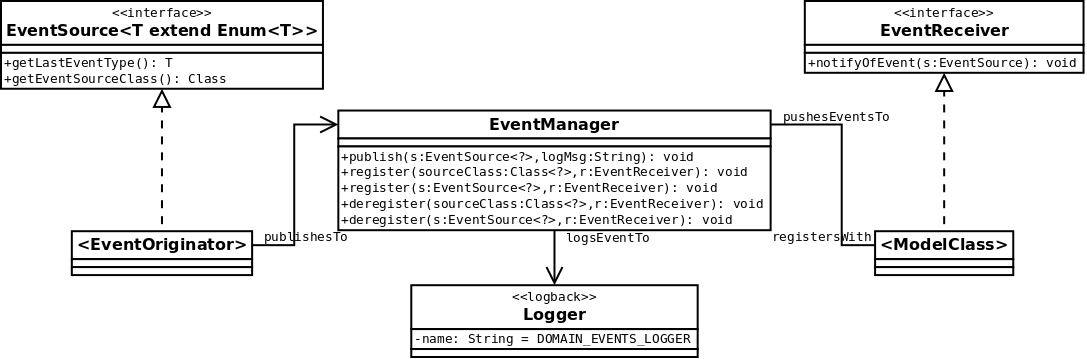
Figure 4: Overview of JSIT domain events architecture for
marker-based events, as a UML class diagram.
Event source classes should define an enum (which specifies the alternative
events that this class can produce) and then implement the
appropriately-parameterised EventSource interface. Whenever they
create an event, they should call the publish method on the event
manager (providing an optional log message for the event).
Event receivers should implement the EventReceiver interface and
register with the event manager for the events they want to subscribe to (either
for all instances of a source class, or only for particular instances). For any
extra information the receiver wants about the event (other than its type
provided by the source's getLastEventType method) the receiver
would need to cast the source and access information directly; this thus
requires that
- the source class anticipates the information that will be required and
provides it appropriately (e.g., via an interface or get methods);
- the receiver is expected to process the event on-receipt (and so the source
need only store information on the latest event if it needs to do so).
See the example models for more details.
Message-Class Events
The basic relationships between classes is shown in figure 5 below:
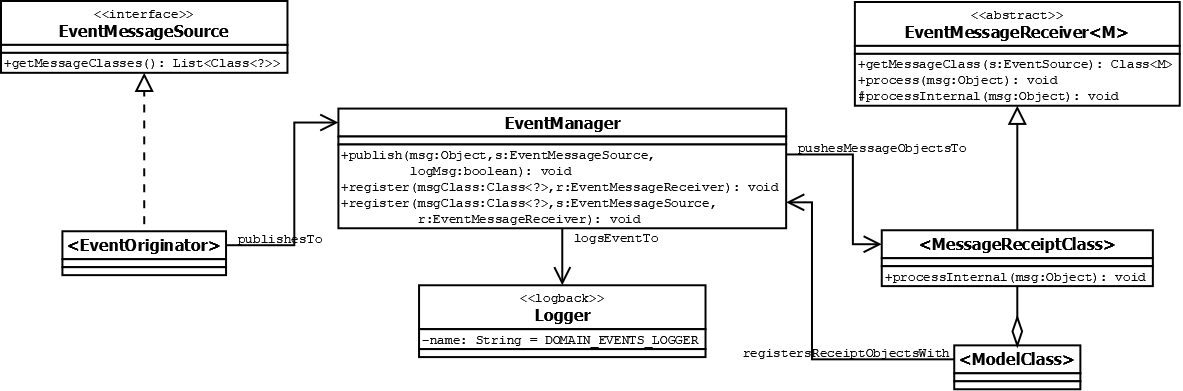
Figure 5: Overview of JSIT domain events architecture for
message-class events, as a UML class diagram.
Event source classes should define classes for each message (typically as
static nested classes) and then implement the EventMessageSource
interface. Whenever they create an event, they should call the
publish method on the event manager passing the message object
(optionally logging the event via its toString method).
Event receivers should implement a receiving class per-message-type (via an
appropriately-parameterised subclass of the abstract
EventMessageReceiver class) and then register instances of these
receiving classes with the event manager for the events they want to subscribe
to (either for all instances of a message class, or only for instances from a
particular source).
Run Reproducibility
The production of the settings file is currently
disabled if running with Java 9+ because of an incompatibility with the
XStream serialisation library used.
As long as your model version file and model source paths file are in place,
there is nothing else that has to be done (unless you are not using a
helper library). Settings for the run will be produced in a
settings.xml XML file in your outputs folder (in a run-specific
sub-folder, along with your logs).
The settings file includes:
- information from the model version file (e.g., model name/version and
location of the source code for the model);
- information on the model environment (e.g., JVM version and Java libraries
used);
- a checksum (MD5 hash) for all the runtime code used in this run;
- all model parameters for this run;
- all the JSIT stochastic elements for the model and any stochasticity control
settings applied for this run (see the stochasticity
control section).
When running simulations via an IDE, you can sometimes get
extra libraries added to the runtime classpath which you don't really want/need
(e.g., JUnit libraries with Eclipse). These will affect the checksum, so check
the settings file carefully (where it lists all libraries used).
In particular, the checksum can be used to check if two runs definitely used
exactly the same runtime code.
There are also runtime checks as to whether the source code for the model has
been changed from that 'registered' via version-control (which may mean this run
is not reproducible); see the Model Version Control
section.
AnyLogic (via helper library)
For an AnyLogic model (when run from the AnyLogic client rather than
exported), the source code is the only code that the user maintains.
(This is built and compiled by AnyLogic automatically before any run.) Thus, the
JSIT run reproducibility and version control functionality is particularly
useful since the source 'is' the model and distinctions between source and
runtime code are less problematic.
The helper library uses the code structure generated by AnyLogic to
automatically identify all the model's parameters (i.e., the Parameters in the
top-level Agent).
Randomness Settings Capture
One caveat is that AnyLogic uses java.util.Random as its random
number generator (RNG). This has the issue that the seed used to instantiate it
cannot be retrieved after it has been created, so JSIT cannot know what
randomness settings you used for this run. To help with this, the AnyLogic JSIT
helper library provides a RandomWithSeedAccess alternative (a
subclass of Random) which you can use instead. Just use this as a
custom generator (in the Experiment's randomness properties), giving it a
specific seed or no parameter for a random seed; e.g.,
new RandomWithSeedAccess(1)
or
new RandomWithSeedAccess()
If you want to use your own preferred RNG, then have it implement the
uk.ac.soton.simulation.jsit.anylogic.SeedAccessibleRNG interface so
that JSIT can read the seed (and it will need to be a subclass of
Random for AnyLogic to use it).
Multi-Run Experiment Reproducibility
Another issue is that, in an AnyLogic multi-run Experiment (e.g., Parameter
Variation or Monte Carlo), setting a fixed seed for reproducibility means that
all the runs will get the same seed and so will have no stochastic
variation. If you want reproducible runs with stochastic variation, you
can use RandomWithSeedAccess instantiated so that it uses the
provided seed as a base which is incremented for each further
instantiation (and thus you get a reproducible set of seed values for the runs
in your multi-run experiment); e.g.,
new RandomWithSeedAccess(1, true)
See the Javadoc for more details, including
some peculiarities due to AnyLogic's threading strategy.
Raw Implementation
You will need to include code in your ModelInitialiser subclass
to identify and prepare for serialisation (using XStream) your model's parameter
values for this run. This typically means using a Java class for your model's
parameters which just has fields for the parameters (and nothing else) so that
XStream will serialise that cleanly.
To get a feel for how that can be done, have a look at the MASON-based demo
model.
Model Version Control
As discussed earlier, you specify in your model version file which version
control system you are using for your model. You use your commit script to
commit (when using a VCS) or checkpoint (when not) your model. (I'll just refer
to 'commits' generally in what follows, although the non-VCS case is technically
something slightly different.)
Your commit message should be specified in a workingChanges.txt
file in the same directory as the commit script (which is the root directory of
the commit). After your commit, these changes will be appended to the
jsitCommitHistory.txt (which is created if it does not exist)
together with a header showing the commit time and source directories checksum
(see later). You can therefore use this second file as a history of all your
commits, which you could potentially store in the VCS as well.
Future versions of JSIT will allow you to specify more
precisely what runtime checks you want and when they should be an error (rather
than a warning). These improved capabilities will also more elegantly handle the
distinction between 'real' source code and libraries, and give the user more
control over how the processing works.
There is currently a basic assumption that the source code directories you
specify do, in fact, contain the version-controlled source for what is being
run. Future versions of JSIT will attempt to check this a little more
rigorously. (A completely accurate check is not really possible without
JSIT actually compiling your code and checking the outcomes.)
At runtime, if you specified the SimSourcePath property in your
model source paths file, JSIT will check whether the source code for the model
has been changed from its state at the last commit, and will issue a warning
message if so (which means that you may not be able to reproduce this run of the
model).
NB: The source code for your model is taken as all the files
in your source directories, whether they are under version-control or
not. (Your model version file and any hidden folders, such as those used by
SVN, are ignored.) This is normally what you want to happen because your source
folders may include other not-in-the-VCS code that your model uses at runtime;
typically third-party libraries (which it is not best-practice to include in the
VCS). You want to check that none of these files have been altered at
runtime from their state at commit-time. However, having not-in-VCS code in your
source folders is not ideal from a run reproducibility perspective because you
have no straightforward way of retrieving these non-VCS files if you want to
reproduce a run. However, as the Run Reproducibility
section states, JSIT does record all the libraries (and other classpath folders)
used for a run (but not currently any provenance of where these files came from)
which will help in reproducing the code.
No Version Control System (model 'checkpointing')
When you run your commit script it will checkpoint your simulation source
directories by calculating a checksum (MD5 hash) for its contents and storing
this, together with a checkpoint timestamp, in the model version file. This
checksum excludes your model version file and any hidden files. If, at
runtime, the files on the simulation source code path do not match this
checksum, the source code has changed and is flagged.
You can therefore use the batch script as a 'poor man's
version-control-system' to checkpoint versions of the model code. (If you want
these different versions to be retrievable in future, it is your responsibility
to store them in some suitable way; this is what a VCS is designed for, so I
strongly recommend you use one instead!) By looking at the model version file in
a particular copy of the model code, you can see which checkpointed version it
is.
Subversion
When you run your commit script it will commit your simulation source code to
the SVN server and, in the model version file, store a commit timestamp and
checksum (MD5 hash) for the source code directories (as specified in the model
source paths configuration file). Using SVN keyword substitution, the model
version file also stores details of the on-server URL and SVN revision for the
commit.
When running a model, you may have checked-out source code (i.e., with SVN
metadata) or exported source code (i.e., just the 'plain' source files). In both
cases, JSIT will check whether the source code has changed checksum (which, as
mentioned earlier, will include any not-in-VCS code). Where you have checked-out
source, JSIT will also check if this source has been modified from what was
checked out (via SVN operations), so you can determine if any changes are in
VCS-controlled source or elsewhere.
If you forget and commit the source code without using the batch script, just
run it later to register a follow-on JSIT commit.
Note: It is your choice how you structure your source directories, and
which you specify in the model source paths configuration file. If you want to
only specify directories which include in-VCS code you can do, but that means
any not-in-VCS files used at runtime (e.g., JAR libraries) will not be included
in the source checks. In any case, you can use the separate checksum of all
runtime code in your JSIT-produced per-run settings file (see Run Reproducibility) to determine if the total set of runtime
code has changed from a previous run.
Java Class Reference
There is a full Javadoc-based JSIT API
reference.